


Search by number
You can look up any phone number in the PhoneBlock database, even without a call having taken place.
How to search for a number
Step 1: Open search
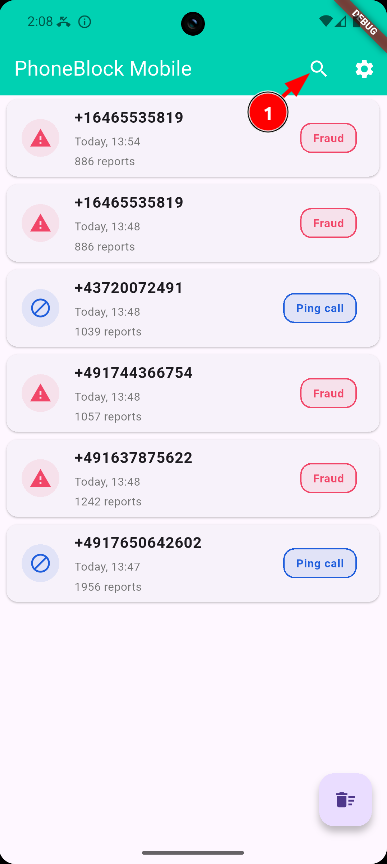
Tap on the magnifying glass icon at the top right to open the search function
Step 2: Enter number
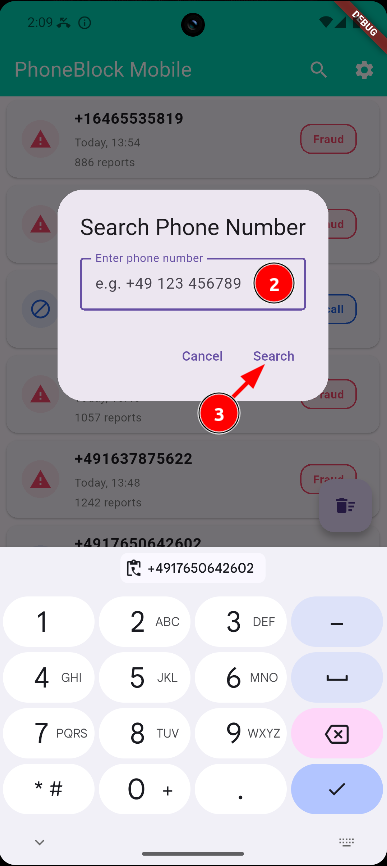
Enter the phone number and tap on "Search"
What the search shows
After the search you will see the following information about the number:
If the number is known:
- SPAM score: Number of negative ratings
- Categories: Type of SPAM (advertising, fraud, etc.)
- Comments: Testimonials from other users
- Reviews: Positive and negative reports
What you can do after the search:
- Rate number as SPAM or legitimate
- Add to blacklist (always block)
If the number is unknown:
- The app indicates that no information is available
- Add to whitelist (never block)
Read comments from other users
- A SPAM rating adds the number to your blacklist
- A Legitim rating adds the number to your whitelist
Tip: If you have received a suspicious call from an unknown number, you can look it up here and report it as SPAM.
Search tips
Format of the telephone number
You can enter numbers with or without a country code:
- With country code: +49 30 12345678 (Germany), +41 44 1234567 (Switzerland), +43 1 1234567 (Austria)
- Without country code: The number is automatically supplemented with the country code from your settings
Tip: If you are looking for a foreign number, always enter the full country code.
Data protection during the search
During the search, the number is transmitted to the PhoneBlock server in plain text. This is necessary so that you can rate the number and add it to the database.
Important: The hash-based data protection function (SHA-1) is only used for incoming calls. For the active search, the complete transmission of the number is required to enable all functions (rating, comments).
When is the search useful?
Frequent use cases:
- Check the unknown number on the display before you answer the phone
- Look up missed calls
- Check numbers from SMS or e-mails
- Check whether the number is legitimate before calling back
What you can do after the search:
- Rating as SPAM (will be added to the blacklist → always blocked)
- Rating as legitimate (will be added to the whitelist → never blocked)
- Read comments from other users
- Optionally add your own comment
Note: Rating and adding to the list is one and the same action!