


Android installation
PhoneBlock Mobile App
The PhoneBlock Mobile App is the official app for detecting and blocking SPAM calls directly on your Android smartphone. The app uses Android's built-in call filtering to automatically block SPAM calls before your phone rings.
Functions
- Automatic SPAM blocking: Calls from known SPAM numbers are blocked directly
- Call history: Overview of blocked and missed calls (only from unknown numbers that are not in your contact list)
- Report number: Report SPAM numbers directly from the app
- Personal lists: Manage your own blacklist and whitelist
- Maximum data protection: For incoming calls, only the SHA-1 hash of the number is transmitted to the server, not the number itself. PhoneBlock therefore does not find out who has called unless it is a known SPAM number.
- No contact list access: The app does not need access to your contacts. Numbers from your phone book are never processed by PhoneBlock Mobile.
Installation
Download the PhoneBlock Mobile app from the Google Play Store and open it:
Step 1: Open the app
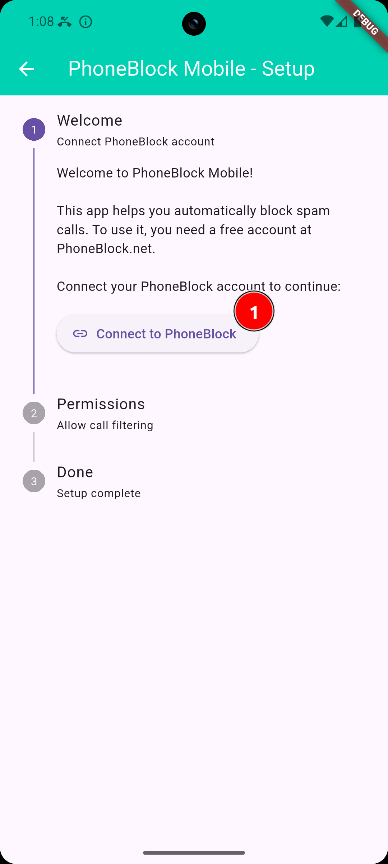
Open the app and tap "Connect to PhoneBlock"
Step 2: Log in
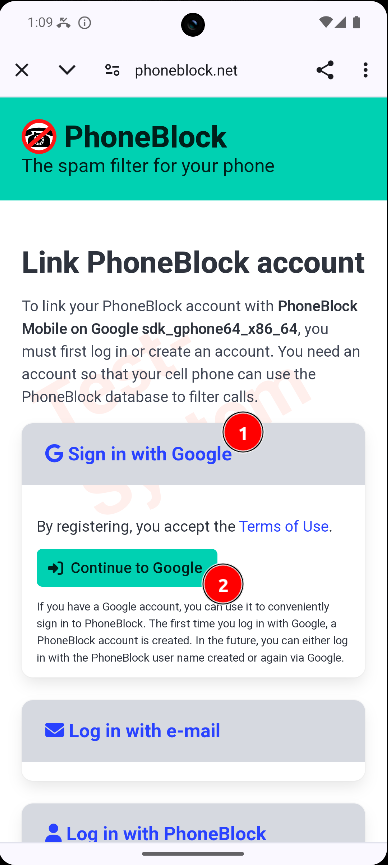
Log in to PhoneBlock (e.g. with Google)
Step 3: Confirm token
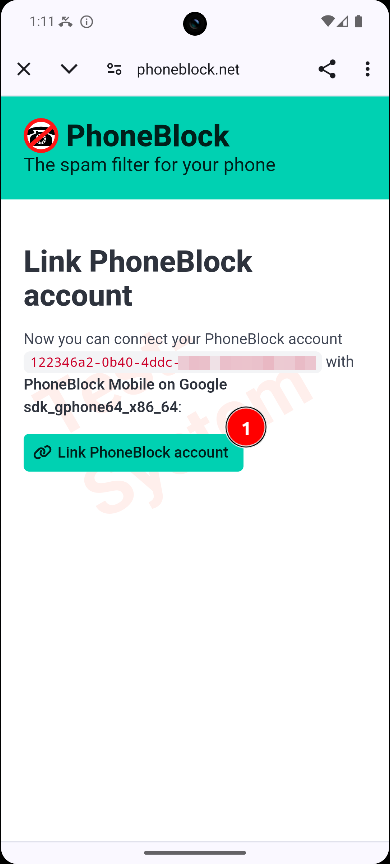
Confirm token creation for the app
Step 4: Request authorization
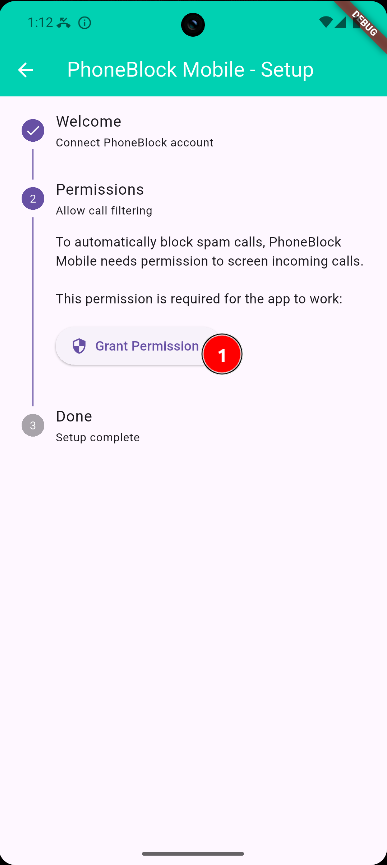
Tap on "Request authorization"
Step 5: Grant authorization
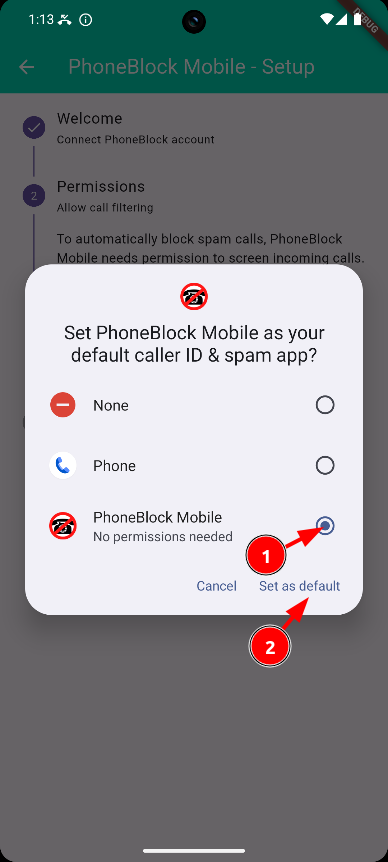
Activate PhoneBlock Mobile in the Android settings
Step 6: Done!
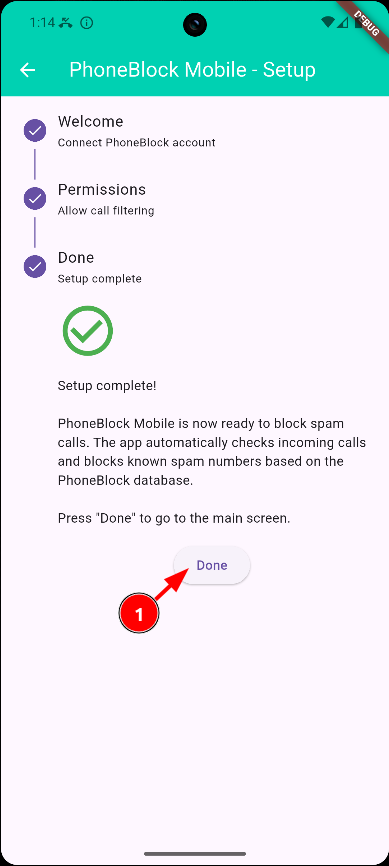
The app is now active
System requirement: PhoneBlock Mobile requires at least Android 10 (API 29). Call filtering (CallScreeningService) is only available in Android from this version onwards.
What can you do now?
The app is now active and automatically blocks SPAM calls. In the app you can:
- View blocked and missed calls
- Report numbers as SPAM or legitimate
- Manage your personal blacklist and whitelist
- Search by number
Important for those switching from CardDAV synchronization:
If you have previously used the CardDAV method with PeopleSync or DAVx⁵, you must perform the following steps before using PhoneBlock Mobile:
- Deactivate the CardDAV synchronization of the PhoneBlock blocklist in PeopleSync/DAVx⁵
- Delete the synchronized SPAM contacts from your phone book
Reason: For data protection reasons, PhoneBlock Mobile does not process numbers that are saved in your contact list. If SPAM numbers remain saved as contacts, they cannot be recognized and blocked by the app.
Alternative: SpamBlocker
In addition to the official PhoneBlock Mobile app, you can also use the independent app SpamBlocker and integrate the PhoneBlock database. You can find instructions here: Setup SpamBlocker with PhoneBlock.
Comparison: PhoneBlock Mobile vs. SpamBlocker
| Function | PhoneBlock Mobile | SpamBlocker |
|---|---|---|
| Availability | Play Store | Alternative stores only |
| Simplicity of installation | Trivial | For experts only |
| Block SPAM calls | Yes | Yes |
| Call history | Yes | Yes |
| Report SPAM | In the app | About website |
| Personal lists | Yes, synchronized | Yes, local |
| Data protection | SHA-1 hash | SHA-1 hash |
| PhoneBlock Integration | Native | Manually configurable |
| Other SPAM databases | No | Yes (several) |
| Advanced filter options | Base | Extensive |
| SMS filtering | No | Yes |
| Development | PhoneBlock Team | Independent (aj3423) |
Recommendation: If you want a simple, directly integrated solution for PhoneBlock, use PhoneBlock Mobile. If you want to use advanced filter functions, SMS filtering or multiple SPAM databases, SpamBlocker is the better choice.
Note: SpamBlocker is an independent app. Please contact the developer directly if you have any problems.
Alternative: CardDAV synchronization (obsolete)
The previous method using CardDAV synchronization with apps such as PeopleSync or DAVx⁵ is still possible, but no longer recommended. This method only shows SPAM numbers in your contacts, but does not block calls.
Advantages of the CardDAV method:
- Also works on older Android versions (before Android 10)
- Shows SPAM label in missed calls
Disadvantages:
- No automatic blocking
- Phone still rings with SPAM calls
- Several thousand SPAM entries appear in your address book
- Additional app required for CardDAV sync
- More complex setup
If you still want to use the CardDAV method, you can find the instructions in the PhoneBlock blog.